
Download Kingshiper File Compressor – Free, Secure, Batch Compression for Windows, Mac, Android, iOS
Kingshiper File Compressor is a powerful, all-in-one file compression tool designed to simplify your digital workflow. Whether you're managing large video files, reducing image sizes, or shrinking PDFs, PowerPoint, Word, or Excel documents, this software delivers efficient compression without sacrificing quality. With support for over 20 file formats including MP4, AVI, JPG, PNG, DOC, PPT, XLS, and more, Kingshiper File Compressor helps you save storage space, speed up file transfers, and share content effortlessly.
The app features a clean, intuitive interface and supports batch processing—ideal for users handling multiple files at once. All compression happens locally on your device, ensuring your data remains private and secure. Available for Windows, Mac, Android, and iOS, this free software is perfect for students, professionals, and content creators who want to optimize their digital files with ease.
Why Choose Kingshiper File Compressor for Your File Management Needs?
Kingshiper File Compressor stands out in the crowded file compression market by offering a unified solution for multiple file types. Unlike many tools that specialize in just one format—like video or PDF—this software handles everything from images and audio to office documents and presentations. This versatility makes it a must-have for anyone dealing with diverse file types across personal and professional projects.
The software’s core strength lies in its ability to compress files significantly while preserving visual and audio fidelity. For example, a 100MB MP4 video can be reduced to under 30MB with minimal quality loss, ideal for email attachments or cloud storage uploads. Similarly, large PowerPoint presentations are often reduced by up to 90% in size, making them easy to share without lag or compatibility issues.
Another major advantage is the batch compression feature. Instead of compressing files one by one, users can select multiple files at once and apply compression settings across the board. This saves hours of manual work, especially when preparing portfolios, presentations, or multimedia content for submission.
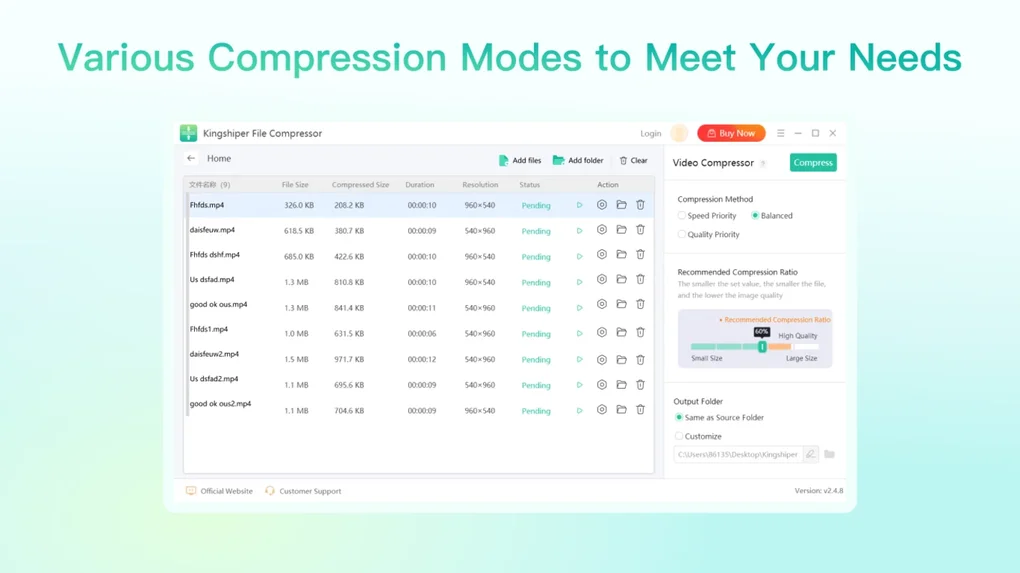
The interface is clean and user-friendly, with clear options for adjusting compression levels—low, medium, high—depending on your needs. Whether you're a photographer reducing image file sizes for web use or a student compressing a research paper with embedded graphics, Kingshiper delivers consistent results. The software also includes a preview function that lets you compare original and compressed files side by side, ensuring you’re satisfied with the outcome before finalizing.
With no watermarks, no hidden fees, and no ads in the free version, Kingshiper File Compressor offers a truly hassle-free experience.
Key Features That Make Kingshiper File Compressor a Game-Changer
- Supports batch compression for videos (MP4, AVI, FLV), images (JPG, PNG), audio (MP3, WAV), GIFs, PDFs, Word (DOC), Excel (XLS), and PowerPoint (PPT)
- Advanced compression algorithms that reduce file size by up to 90% without noticeable quality loss
- Local processing ensures data privacy—no files are uploaded to external servers
- Intuitive drag-and-drop interface with real-time preview and side-by-side comparison
- Customizable compression levels: low, medium, high, and ultra-high for precise control
- Fast processing speed with minimal impact on system performance
- Available for Windows, Mac, Android, and iOS—ideal for cross-device users
- Free to download and use with no trial limitations or hidden charges
How to Install and Use Kingshiper File Compressor on Any Device
Installing Kingshiper File Compressor is quick and straightforward, regardless of your operating system. For Windows and Mac users, simply visit the official website, click the "Download" button, and choose the appropriate version for your system. The installer is lightweight and completes setup in under a minute.
Once installed, launch the app and you’ll be greeted with a minimalistic dashboard. To compress a file, simply drag and drop it into the application window, or use the “Add Files” button to browse your folders. For batch processing, hold Ctrl (or Cmd on Mac) to select multiple files from different directories.
After adding your files, select the desired compression level from the dropdown menu. The software automatically detects the file type and applies the best compression settings accordingly. For instance, when compressing a high-resolution image, the tool intelligently reduces pixel density and optimizes metadata without blurring or distortion.
Once settings are confirmed, click “Start Compression” and wait for the process to finish. The compressed files are saved in a designated output folder, and you can choose to replace the original or keep both. The app also supports exporting to custom folders, which is useful for organizing compressed files by project or client.
For Android and iOS users, the Kingshiper File Compressor app is available on the Google Play Store and Apple App Store. The mobile version offers the same core features—image, video, and document compression—with a touch-optimized interface. You can compress files directly from your phone’s gallery or cloud storage (Google Drive, iCloud), making it perfect for on-the-go file management. The mobile app also supports cloud sync, so you can access compressed files across devices. Whether you’re using a desktop or a smartphone, the experience remains consistent and efficient.
Compatibility and System Requirements for Seamless Performance
Kingshiper File Compressor is designed to run smoothly across a wide range of devices and operating systems. The software is fully compatible with Windows 7 and later, including Windows 10 and Windows 11. For Mac users, it supports macOS 10.14 (Mojave) and above, including Apple Silicon (M1/M2) Macs, ensuring optimal performance on newer hardware. The mobile apps are available for Android 8.0 (Oreo) and above, as well as iOS 12 and later, making it accessible to most smartphone users.
In terms of system requirements, the software is lightweight and doesn’t demand high-end hardware. On desktops, it requires at least 2GB of RAM and 100MB of free disk space. The CPU usage is minimal during compression, so you can continue working on other tasks without slowdowns.
The mobile versions are optimized for battery efficiency and memory usage, ensuring long-term usability without draining your device. Importantly, all file processing occurs locally—your files never leave your device, which is a major win for privacy-conscious users. This local processing also means you don’t need an internet connection to use the software, making it ideal for offline environments or secure networks.
For users managing large volumes of data, the software handles up to 100 files in a single batch without crashing or lagging. The interface remains responsive even with high-resolution media files, thanks to efficient memory management. Additionally, Kingshiper regularly releases updates to improve compatibility with new file formats and enhance performance. You can enable auto-update notifications in the settings to ensure you’re always using the latest version with the best features and security patches.
Pros and Cons: Is Kingshiper File Compressor Worth It?
Pros
- Supports a wide range of file types including video, image, audio, PDF, Word, Excel, and PowerPoint
- Batch compression saves time and effort for bulk file management
- Local processing ensures complete data privacy and security
- Free to download and use with no hidden fees or ads
- Intuitive interface suitable for beginners and advanced users alike
- High compression ratios with minimal quality loss
- Available on Windows, Mac, Android, and iOS for cross-device access
Cons
- Limited advanced editing features (e.g., no video trimming or audio editing)
- No cloud storage integration beyond basic file export
- Mobile version lacks some desktop-level customization options
Frequently Asked Questions (FAQ)
Final Verdict: A Must-Have Tool for Every Digital User
If you're looking for a reliable, secure, and free file compression tool that works across all your devices, Kingshiper File Compressor is an excellent choice. Its ability to handle multiple file types with batch processing, combined with local data security, makes it a standout in the category. Whether you're a student reducing a thesis file, a content creator optimizing video uploads, or a professional sharing large presentations, this software streamlines your workflow and saves valuable storage space.
With a user-friendly interface, fast processing, and consistent results, Kingshiper delivers real value—without any strings attached. The free version offers everything you need for everyday use, and the developers continue to improve the app through regular updates. Don’t miss out on this powerful tool that simplifies file management. Download Kingshiper File Compressor today and take control of your digital files.







